

Curriculum Intelligence Infrastructure
Turning fragmented curriculum data into a connected system for mapping, coverage, planning and AI-assisted learning journeys.
Contents · 11 chapters
The information existed. The relationships didn’t.
- ROLE
- Product Designer
- TIMELINE
- 2025
- CLIENT
- Confidential / NDA
- DISCIPLINES
- Product Design · Systems Design · AI UX
The whole tool, rebuilt on invented data. Click through it.
All screens shown here are anonymised rebuilds using invented data.
The curriculum team was working across frameworks, competencies, learning resources, and content spread across multiple spreadsheets.
The information was there. The difficult part was answering questions across it.
- Does this competency correspond to something in another framework?
- What does a learner need to understand before reaching this competency?
- Do we already have content that teaches it?
- Which parts of the curriculum are underserved?
- Does this correspond to another framework?
- What comes before this competency?
- Do we have content that teaches it?
- Which parts are underserved?
Answering any of these meant piecing together information from different sources and reconstructing the relationships manually.
Initially, this looked like a data-management problem.
It turned out to be a relationship problem.
A curriculum isn’t really a list. It’s a network.
As I worked through the different curriculum workflows, I realised that the individual rows in a spreadsheet weren’t the interesting part.
What mattered was how they connected.
- A competency belongs to a framework.
- It may depend on another competency.
- It may correspond to an outcome in another framework.
- Multiple learning resources may address it to different degrees.
- And whether those resources exist ultimately affects what the content team needs to create.
So instead of treating Crosswalk, Coverage, Dependencies, Resources, and Learning Journeys as isolated workflows, I started looking at the common structure underneath them.
Framework → Competency → Dependencies → Resources → Coverage → Learning Journey → Content Planning
That became the foundation for the work.
The design question changed from:
How do we make curriculum data easier to manage?
to:
How do we make the relationships inside curriculum data visible and useful?
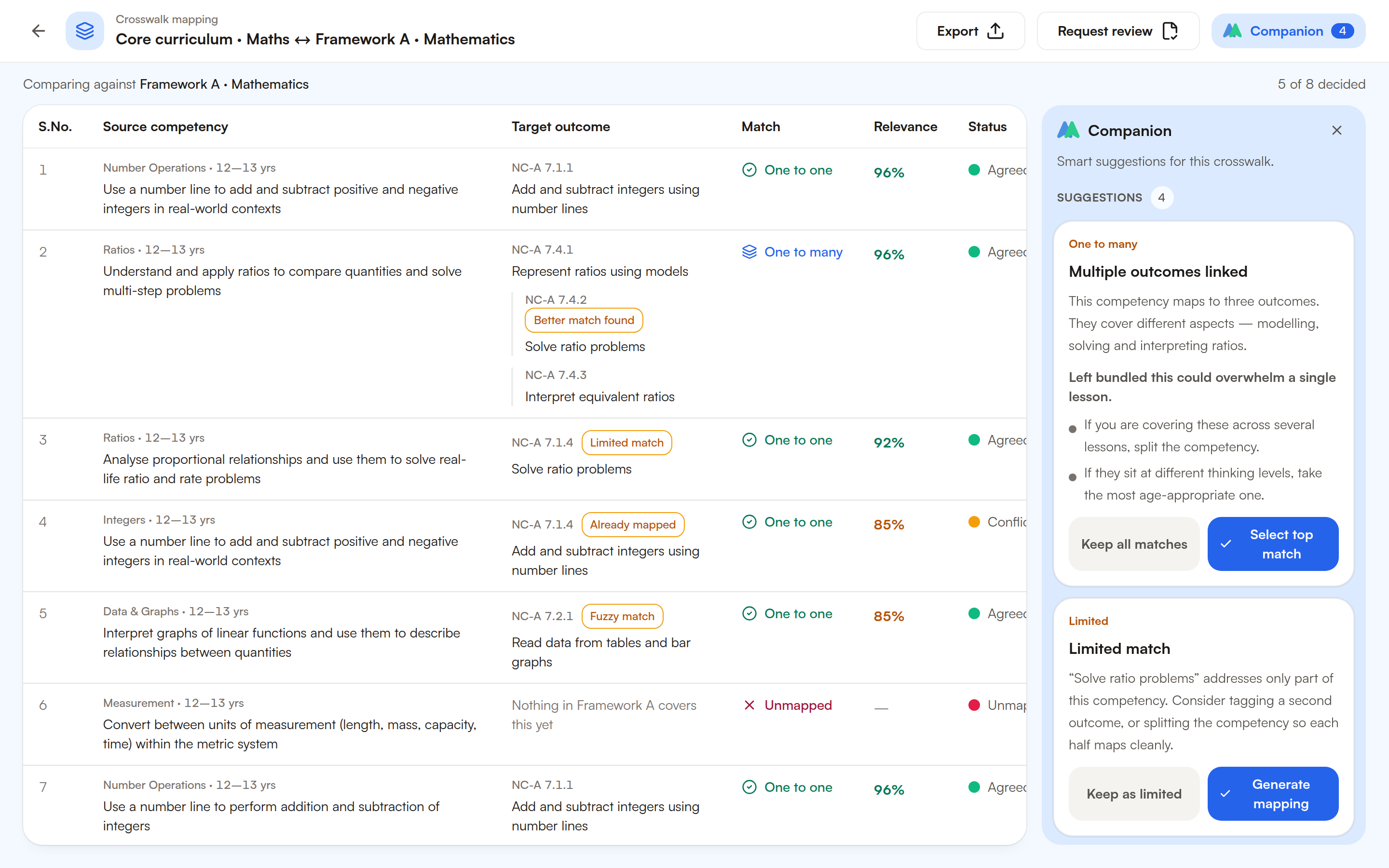
Comparing curricula without comparing spreadsheets
Different curriculum frameworks often describe similar learning outcomes using different structures and language.
Understanding where two frameworks aligned meant inspecting competencies across both and determining how closely they corresponded.
I designed Crosswalk to bring that comparison into one workspace.
Instead of moving between sources, users could select two frameworks and inspect the relationships between their competencies directly.
But a simple match / no match model wasn’t enough.
Curriculum alignment can be imperfect. One competency might fully correspond to another. Another might only address part of it. And sometimes there simply isn’t an equivalent.
So the interface surfaced different states:
Covered · Partially covered · Missing
Each relationship could also carry a relevance score, mapping type, and review status.
- Search
- Compare
- Interpret
- Document
- Select frameworks
- Review relationships
- Identify gaps
This changed the workflow from:
Search → Compare → Interpret → Document
to:
Select frameworks → Review relationships → Identify gaps
And that last state — Missing — turned out to be particularly useful.
A missing relationship wasn’t just an empty cell.
It was a signal that could feed into the rest of the system.
Knowing what to teach isn’t enough. You need to know what comes before it.
Learning outcomes don’t exist independently.
To understand one competency, a learner may first need knowledge represented by several earlier competencies.
Many of these prerequisite relationships weren’t explicitly represented in the existing information.
So I designed a dependency view that made them inspectable.
For any competency, a curriculum expert could see relationships such as:
- Existingprerequisites already connected
- Suggestedadditional relationships worth considering
- Missingpossible gaps in the learning sequence
- Needs reviewrelationships that may not belong
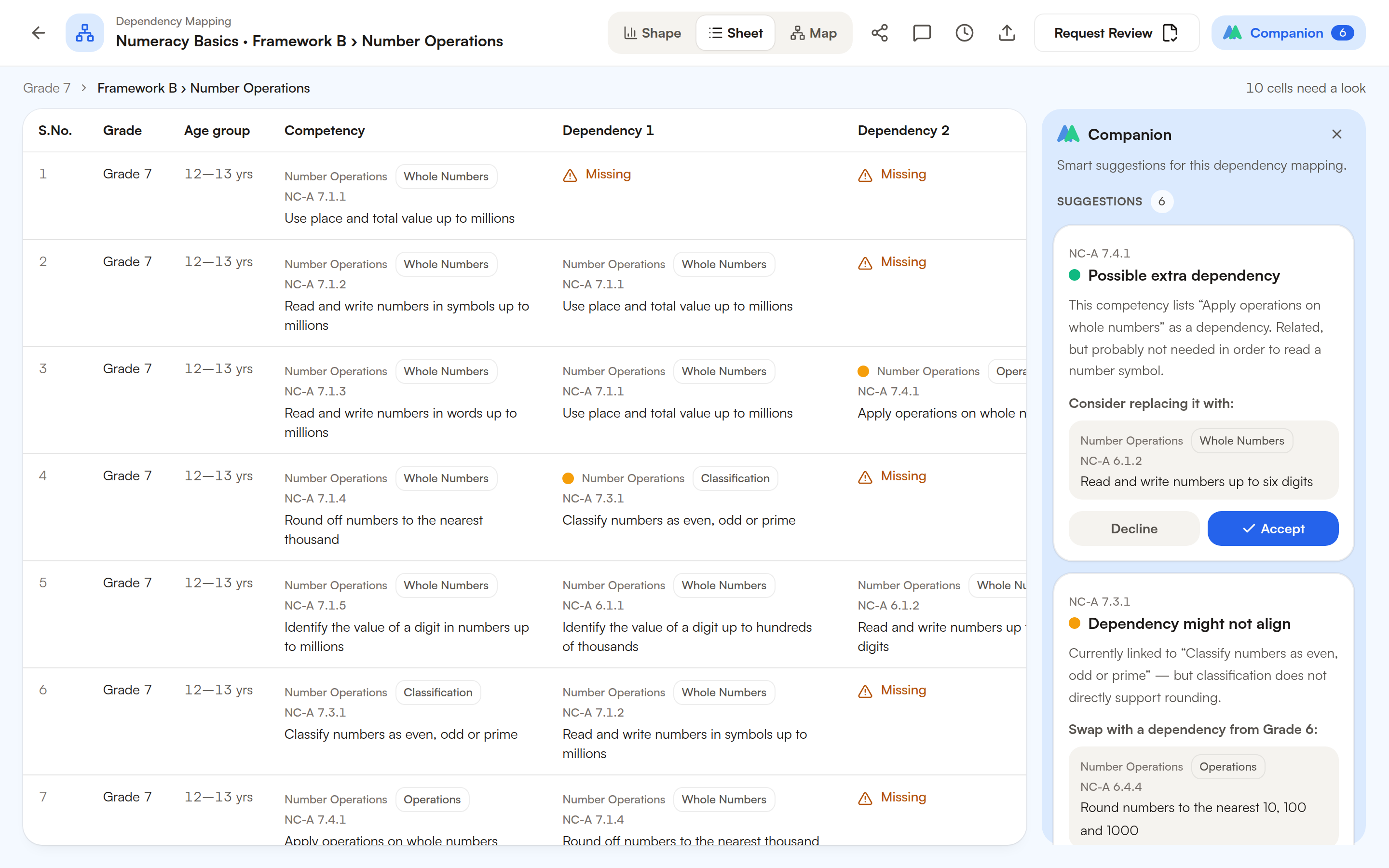
The goal wasn’t to make the system decide the curriculum.
It was to make the structure visible enough for an expert to inspect it.
Once these dependencies were represented explicitly, they could also become useful elsewhere.
They could help answer not only:
“What is related to this competency?”
but:
“What should a learner encounter before reaching it?”
That opened up the next workflow.
From finding competencies to sequencing learning
A curriculum expert could begin with an intent:
Framework · Learning level · Domain
From there, the system could use the curriculum structure to help construct a learning journey.
The important part wasn’t simply putting an AI prompt on top of the product.
The AI had context.
It could work with the structured information underneath the experience:
Competencies · Dependencies · Existing resources
That meant a generated journey could consider which competencies belonged in the sequence, what prerequisite knowledge might come first, and whether supporting content already existed.
- 01Competency A✓ Resource available
- 02Competency B✓ Resource available
- 03Competency C! Content gap
- 04Competency D✓ Resource available
A journey might look like:
- 01 — Competency A · Resource available
- 02 — Competency B · Resource available
- 03 — Competency C · Content gap
- 04 — Competency D · Resource available
So the prompt expressed the user’s intent.
The curriculum model provided the context.
AI became a reasoning layer over the curriculum infrastructure, rather than a replacement for it.
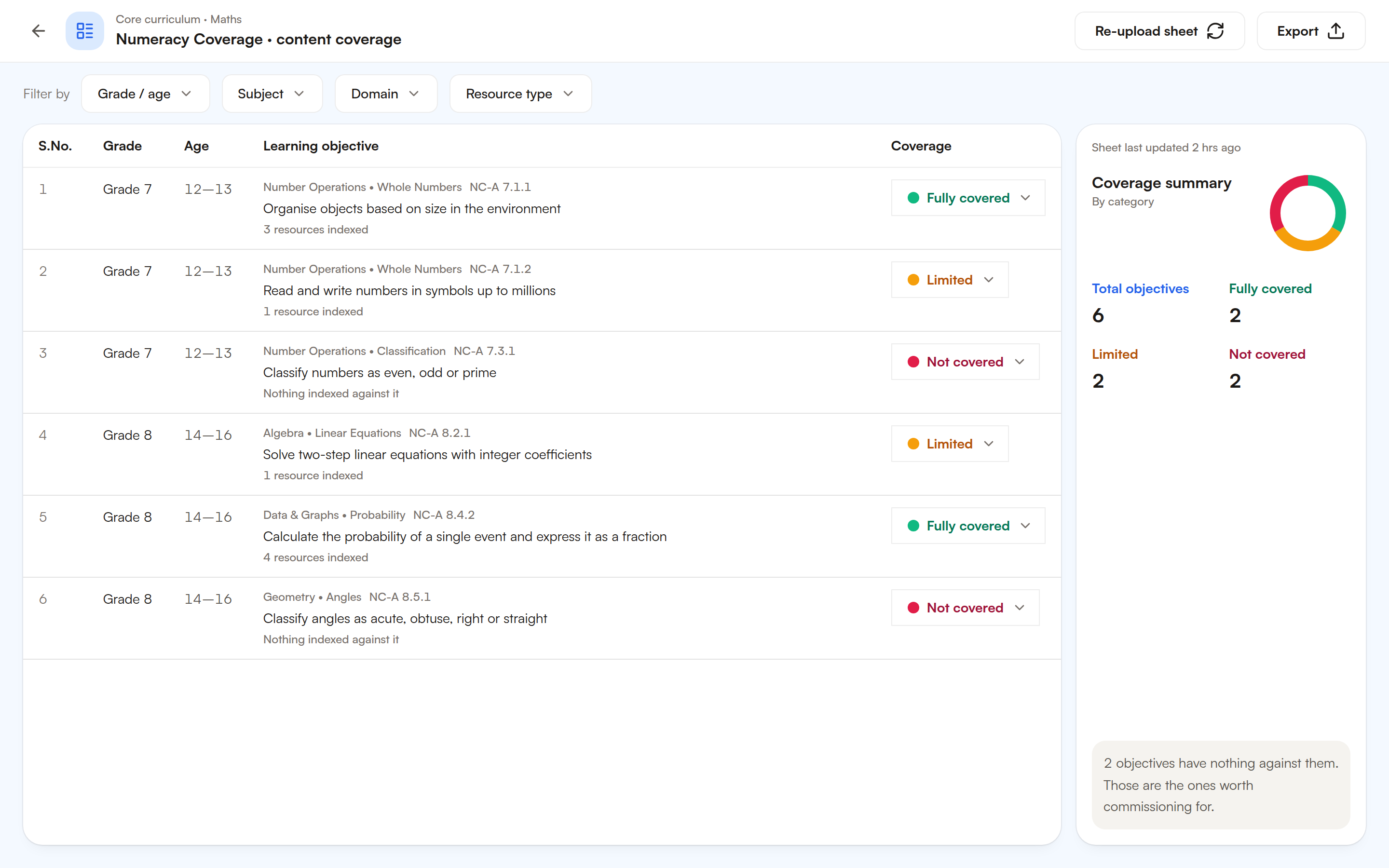
Having a lot of content doesn’t mean the curriculum is covered.
Once resources and competencies were connected, another question became possible to answer:
How much of this curriculum can our existing content actually support?
Instead of measuring the size of the content library, Coverage looked at the curriculum itself.
For each area, the team could see whether it was:
Covered · Partially covered · Not covered
| Numbers | Shapes | Measure | Patterns | |
|---|---|---|---|---|
| Level 01 | ||||
| Level 02 | ||||
| Level 03 | ||||
| Level 04 |
This made gaps visible across learning levels and domains rather than buried inside individual resources.
The question changed from:
“How much content do we have?”
to:
“Where is the curriculum underserved?”
And that distinction mattered because a curriculum gap doesn’t necessarily mean something new needs to be created.
First, you need to understand what already exists.
A gap is a question about the library before it becomes a brief for new content.
When Coverage surfaced a gap, the next step was to inspect the existing resources.
- A video might address most of a competency.
- An activity might cover one part of it.
- A game might be relevant across several curricula.
The Resource Map connected resources back to the competencies they supported and showed the extent of that coverage.
That created a clearer decision path:
Identify gap → Inspect resources → Evaluate coverage → Reuse / Adapt / Create
It also worked in the other direction.
Starting with a resource, the team could see where it was being used and which curriculum outcomes depended on it.
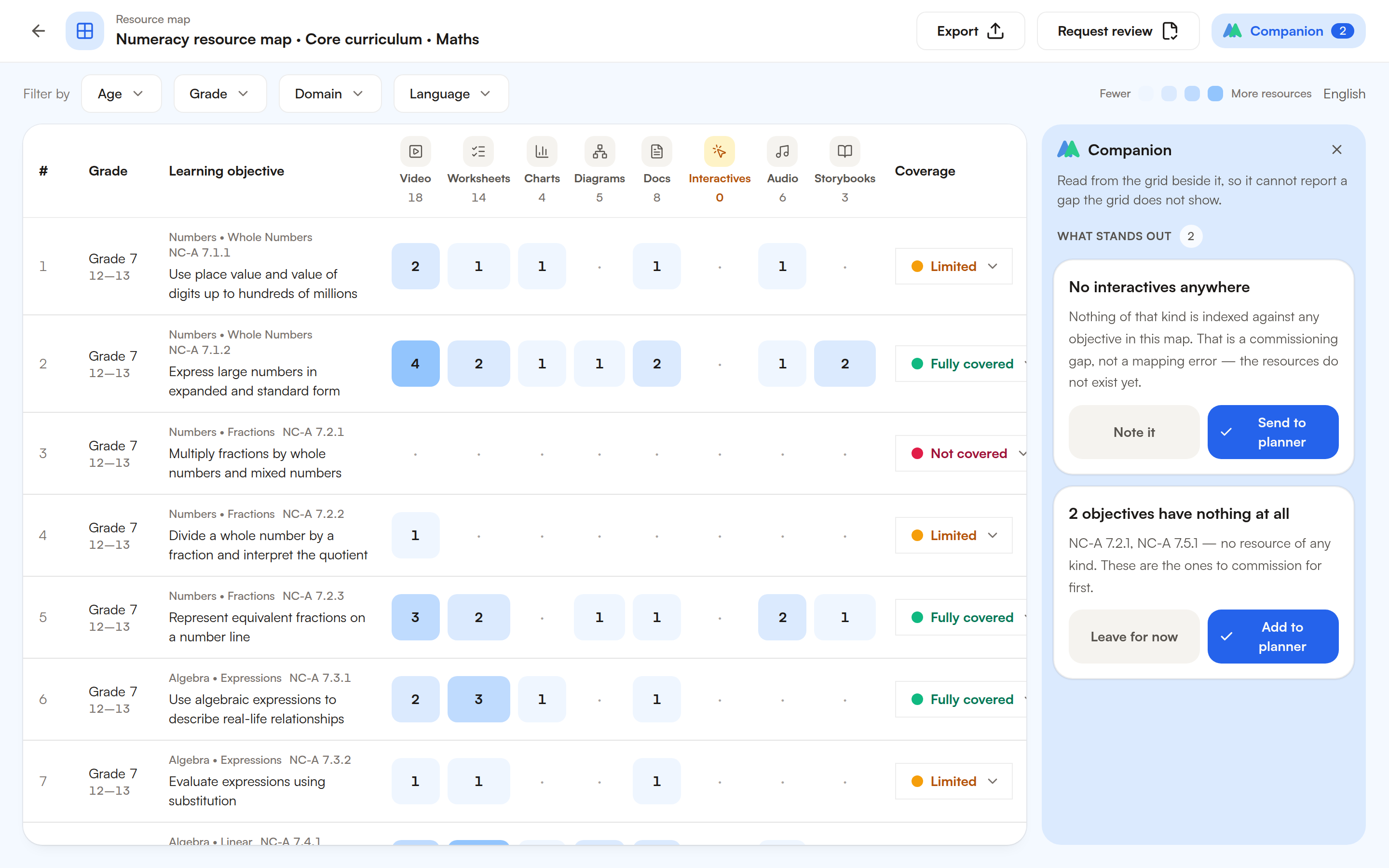
Curriculum planning and content inventory were no longer separate views of the organisation.
They were two sides of the same system.
From understanding the curriculum to deciding what to create.
By connecting these workflows, the system could begin answering a sequence of increasingly useful questions.
- 01What does the curriculum expect?
- 02What does the learner need first?
- 03What do we already support?
- 04Do we already have something useful?
- 05What still needs to be created?
- What does the curriculum expect?Crosswalk helped reveal how different frameworks related.
- What does the learner need first?Dependencies made prerequisite relationships visible.
- What do we already support?Coverage showed where existing content addressed the curriculum.
- Do we already have something useful?Resource Map connected gaps back to the content library.
And finally:
What still needs to be created?
The same information could begin informing content planning.
A gap could first trigger a search for an existing resource.
If something suitable existed, it could potentially be reused or adapted.
If not, the gap could become an input into new content creation.
And when that content was eventually connected back to the curriculum, coverage changed.
Curriculum → Gap → Resources → Reuse / Adapt / Create → Content → Coverage → Curriculum
back to curriculum
The loop closed.
One place to ask questions across the system
By this point, different workflows could answer different parts of the curriculum problem.
- Crosswalk understood alignment.
- Dependencies understood prerequisites.
- Coverage understood gaps.
- Resource Map understood the content library.
- Learning Journeys understood sequencing.
But users shouldn’t need to remember which tool contains which answer.
The Companion provided another way into the same infrastructure.
- Crosswalk
- Dependencies
- Coverage
- Resource Map
- Journeys
A user could ask:
- “Which competencies in this domain still need content?”
- “What prerequisites are missing here?”
- “Help me build a learning journey for this domain.”
Instead of treating the conversation as a standalone chatbot, it could draw from the same structured curriculum context powering the workflows underneath it.
The interface became conversational.The intelligence still came from the system beneath it.
What looked like several features was one connected system.
Crosswalk, Dependencies, Coverage, Resource Map, Learning Journeys, and the Companion could easily have become independent tools.
The more useful opportunity was in connecting them.
- A gap discovered while comparing frameworks could appear in Coverage.
- Coverage could lead to Resource Map.
- Resource Map could reveal that appropriate content didn’t exist.
- Dependencies could show what learners needed beforehand.
- Those relationships could help construct a Learning Journey.
- And the same information could eventually inform what content needed to be created.
Each workflow made the others more useful because they were operating over the same curriculum structure.
From storing curriculum information to understanding it.
The project wasn’t ultimately about replacing spreadsheets with nicer screens.
It was about moving from:
Search → Compare → Verify → Repeat
toward a connected curriculum model that could support:
Comparison · Sequencing · Coverage · Resources · Planning · AI assistance
The information already existed.
The important design work was making its relationships explicit — and then designing experiences that allowed people to use those relationships to answer real questions.
I designed the infrastructure connecting curriculum, content, and planning, along with the product experiences that made that infrastructure useful.
- Role
- Product Designer
- Timeline
- 2025
- Client
- Confidential / NDA
- Disciplines
- Product Design · Systems Design · AI UX
MyGooru Companion
An AI companion that understands where you are, where you're going, and what might help you get there.